Discover the best reporting services alternatives 2025 for your business. Compare features, pricing, and performance to find your ideal solution.
Microsoft SQL Server Reporting Services (SSRS) has been useful for organizations, but newer options are superior since they work in the cloud, are quicker to set up, and show data better. This post looks at the finest reporting services choices for 2025, making it easier for you to pick the proper tool for your reporting needs.
Why should you look for more than just traditional reporting services?
The world of reporting has altered a lot. SSRS and other traditional on-premise systems need a lot of IT resources and infrastructure to work. Businesses today require reporting solutions that can be set up quickly, grow easily, and work with data stored in the cloud.
Over the past five years, I’ve personally moved three firms away from old reporting systems. In every case, the savings in time and money were very big.
The Best Reporting Services Alternatives in 2025
Microsoft’s Cloud-First Solution: Power BI
Power BI is at the top of most lists of reporting services choices for 2025 for a good reason. It works well with other Microsoft products and has strong data modeling features.
Main Benefits:
- Updates to the dashboard in real time
- Support for queries in natural language
- Access to reports on mobile devices
- A lot of support from the community
Power BI is especially useful for businesses that already use Azure or Microsoft 365. The Pro edition costs $10 per user per month to start.
Tableau: The Best at Visual Analytics
Tableau is great for making beautiful, interactive charts and graphs. The platform can easily manage huge datasets and lets you customize it in many ways.
Why Use Tableau:
You don’t need much training to use the drag-and-drop interface. It can connect to more than 100 data sources.
- Features for advanced statistical analysis
- Security for businesses
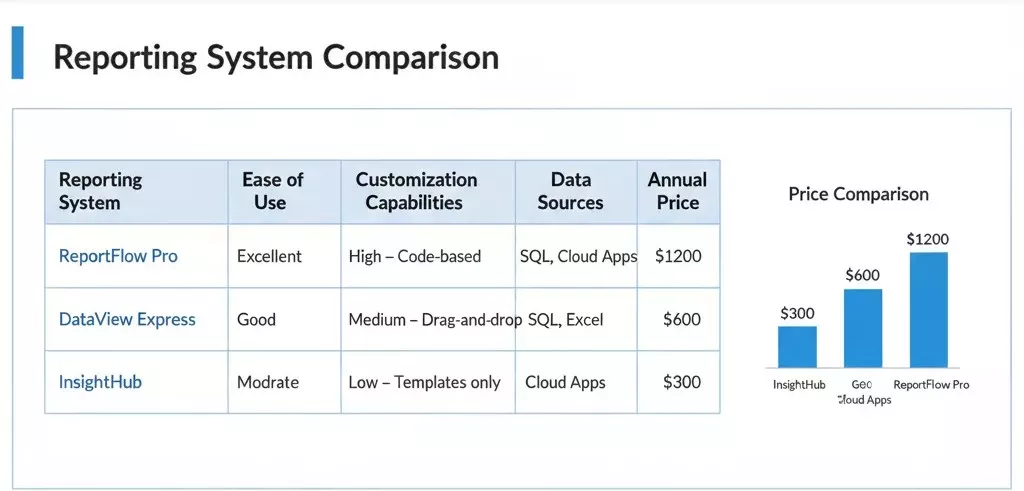
Tableau is a good fit for businesses that want to explore data and create stories using visuals. You should expect to pay more up front than with other options.
Looker (Google Cloud): A platform that is easy for developers to use
Looker is different from other business intelligence reporting solutions since it has its own modeling language, LookML. This method lets developers have full control over how data is defined and how metrics are measured.
Looker’s Benefits:
- Centralized control of data
- Keeping track of several versions of reports
- Built-in analytics features
- Good integration with Google Cloud
Looker’s code-based approach is popular with businesses that have technical teams. It makes sure that all reports and dashboards are the same.
Reporting Tools That Work in the Cloud Getting traction
Metabase: An Open-Source Option
For businesses that are careful with their money, Metabase is a great choice. This open-source platform has all the important reporting tools you need, and you don’t have to pay for a license to use them.
Metabase’s best features:
- Easy SQL and visual query builders
- Options for self-hosting or deploying on the cloud
- Community of active developers
- Included is permission management
Metabase is a great way for small to medium-sized businesses to start using modern reporting.
Domo: Business Intelligence That Does It All
Domo is a single platform that lets you integrate, change, and visualize data. The tool stresses working together and sharing between groups.
What Sets Domo Apart:
- Connectors that are already built for more than 1000 apps
- Features for working together socially
- App for mobile devices to use on the go
- Insights driven by AI
Domo is suitable for businesses that need full-featured data visualization platforms with as little technical work as possible.
Picking the Best Reporting Tool for You
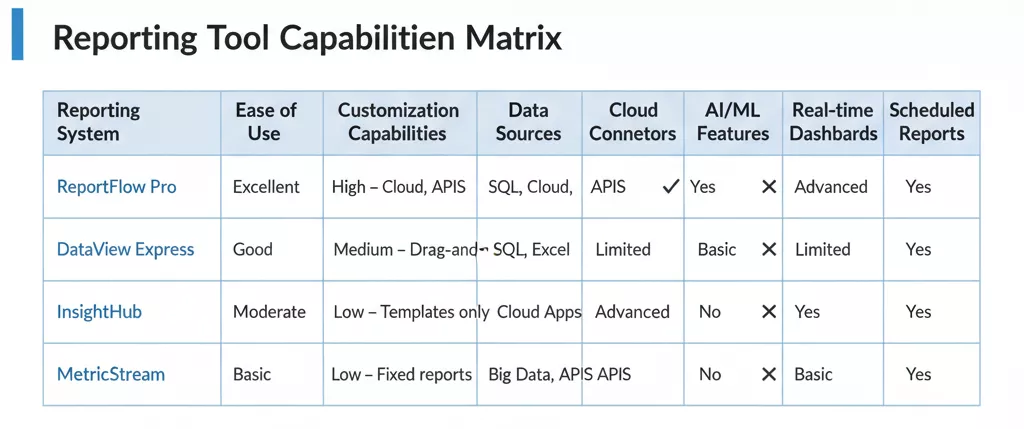
These are some important things to think about while looking at automated reporting software:
- Compatibility with Data Sources: Will it work with the databases and apps you already have?
- Scalability—Can it handle more data as your business grows?
- User Experience: Will it be easy for people who aren’t tech-savvy to use?
- Total Cost: Include costs for license, training, and upkeep.
- Deployment Options: Do you require a cloud, on-premise, or hybrid setup?
From my experience with other self-service reporting platforms, user uptake is more important than flashy features. Pick a solution that your team will really use.
Making the Move Easy
Planning is necessary while moving from old systems. Before fully deploying new corporate reporting software, start with pilot projects to see how it works.
Make a list of all the reports you have and put the most important ones at the top of the list. To make sure things keep going, a lot of businesses use parallel systems for a short time.
Think about working with consultants who know how to use the platform you’ve chosen. Their knowledge speeds up the process and helps you avoid typical mistakes.
In conclusion: How to Find the Right Reporting Match for You
The greatest alternatives to reporting services in 2025 will depend on your needs, budget, and technical skills. Power BI is great for companies who use Microsoft products, Tableau is great for workloads that need a lot of visualization, and Looker is great for environments that are favorable to developers.
First, look at your must-have needs and see what solutions are accessible. Most sellers let you try their products for free. Use this time to see how they work in real life.
What problems are you having with your present reporting system? Please tell us about your experiences in the comments below, and let’s talk about which option could be ideal for you.
Questions that are often asked
What is the best free replacement for SQL Server Reporting Services?
Metabase is the best free alternative to SSRS. It has strong reporting features and doesn’t cost anything to use, making it a good choice for small to medium-sized businesses. There are also Apache Superset and Redash.
Is Power BI a full replacement for SSRS?
Yes, Power BI can do most of the things that SSRS can do for modern businesses. It can support paginated reports (like SSRS), show data in a better way, and be deployed in the cloud. But if you have a lot of bespoke SSRS implementations, you might need to rewrite your reports.
What reporting tool is the easiest for people who aren’t tech-savvy?
Power BI and Tableau both have user-friendly interfaces for business users. Power BI is a little better because its interface is similar to Microsoft’s. Both platforms are easy to learn how to use to make and read basic reports.
How much do other reporting services usually cost?
Prices range from free (for open-source options) to $10 to $70 per user per month for business solutions. Enterprise licenses can cost hundreds of dollars a month. To make sure your budget is correct, you need to include the costs of implementation, training, and maintenance.
Can you trust cloud-based reporting tools with sensitive data?
Modern cloud reporting solutions have enterprise-level security features including encryption, role-based access, and compliance certifications like SOC 2, HIPAA, and GDPR. When set up correctly, many of them offer better security than regular on-premises implementations.
